How to Activate Your Game on Xbox
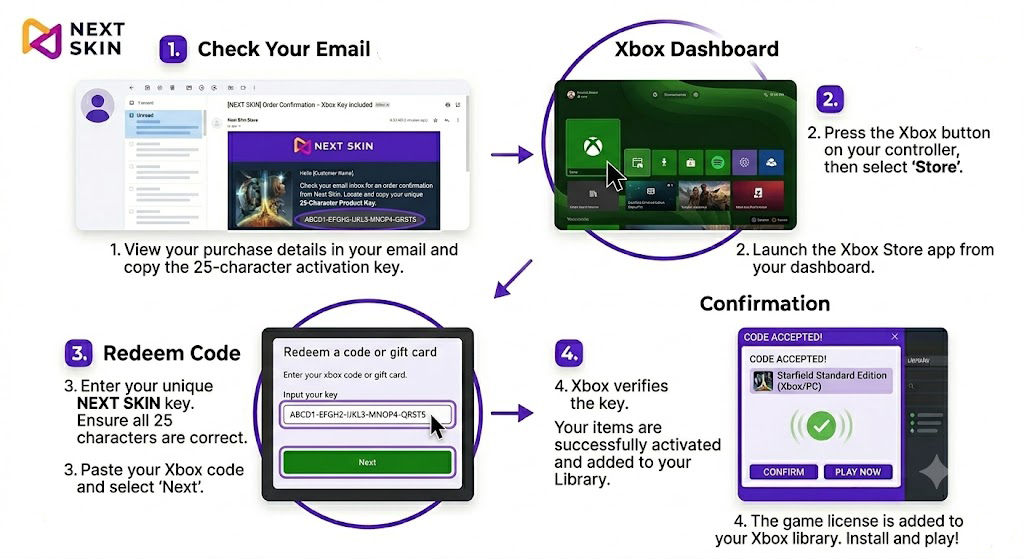
How to Activate Your Game on Xbox
Follow these simple steps to redeem your NEXT SKIN purchase on your Xbox console:
Check Your Email: Look for an order confirmation email from NEXT SKIN. Open it to locate and copy your unique 25-character Product Key.
Open the Store: Press the Xbox button on your controller to open the guide, then navigate to the ‘Store’ app.
Navigate to Redeem: Within the Store menu, select the ‘Redeem’ option (usually found in the side menu or under your profile icon).
Enter Your Key: Enter your unique NEXT SKIN 25-character code into the field and select ‘Check Code’ or ‘Next’.
Confirm and Play: Follow the on-screen instructions to confirm. Once redeemed, your game will be added to your ‘My games & apps’ library, ready for installation.