How to Activate Your Game on PlayStation
How to Activate Your Game on PlayStation
Follow these simple steps to redeem your NEXT SKIN purchase on your PlayStation console:
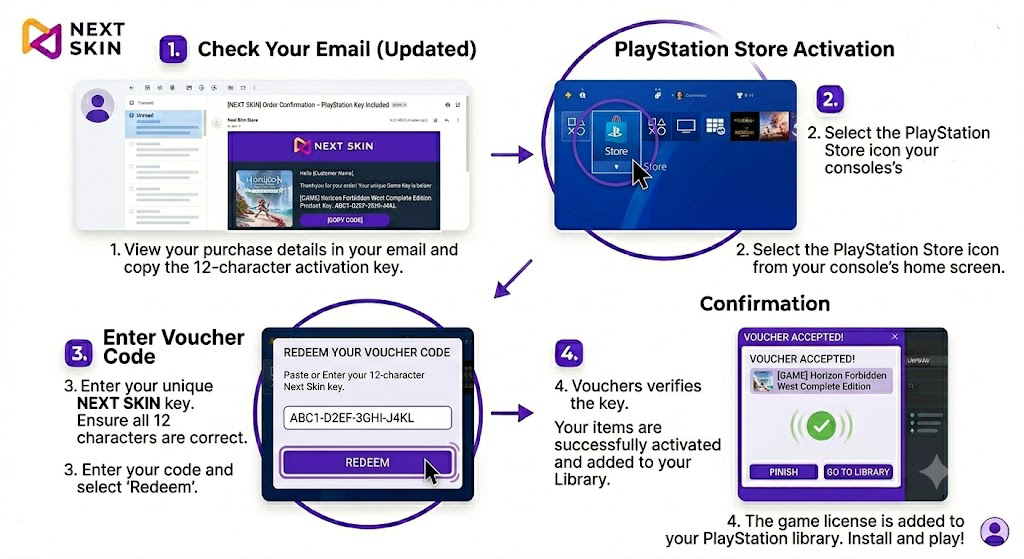
Check Your Email: Once your order is processed, look for an order confirmation email from NEXT SKIN. Open it to locate and copy your unique 12-character voucher code.
Open PlayStation Store: Turn on your console and navigate to the PlayStation Store icon on the home screen.
Navigate to Redeem: Within the store menu, scroll down to the bottom of the sidebar and select ‘Redeem Codes’.
Enter Your Key: Enter your unique NEXT SKIN 12-character voucher code carefully and select ‘Redeem’.
Enjoy Your Game: Once confirmed, the game will be added to your library. You can find it under ‘Game Library’ to download and start playing!